

Even though I love Illustrator, I use the other Adobe products frequently. I use Photoshop all the time with elements I have created in Illustrator. Having the correct color and swatches is essential and I always found it frustrating getting all the correct colors into other CS3 programs. Finally I learned a fast and consistent way to exchange swatches from Illustrator to the other CS3 programs.
Notes
I am using this feature in the Adobe CS3 programs. In CS2 the feature is labeled as Save For Exchange instead of Save Swatch Library as ASE under the pop-up menu in the Swatch panel.
Gradients, Patterns and Tints swatches are not exchangeable.
Saving Swatches
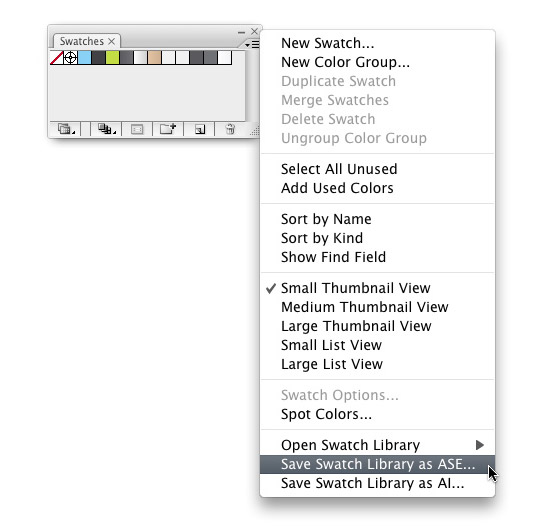
First, set up the Swatch palette with the swatches you want to exchange and trash any swatches you don’t want. Next, choose Save Swatch Library as ASE in the pop-up menu of your Swatch palette, and save the swatches somewhere you won’t forget.
Load Swatches
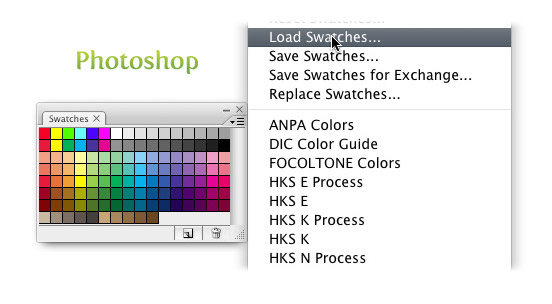
Now your will be able to load the swatches into other CS3 applications. In the Swatch palette of any other CS3 program, bring up the pop-up menu, select Load Swatches and find your saved set!
Exchange
You can save swatches from other CS3 programs and import them into Illustrator, just like you did with the Illustrator swatches. This feature is pretty handy and it can save you a great deal of time!


I’m also commenting to make you understand of the cool encounter my princess went through using your site. She came to understand too many things, not to mention what it is like to have an ideal helping style to have many people very easily thoroughly grasp a number of hard to do things. You truly did more than visitors’ desires. Many thanks for showing the important, trustworthy, informative and also cool thoughts on this topic to Ethel.
Genial parcero!! gracias
i explored your blog right now and i’m really impressed by your tips
although there isn’t much content, your tips are very useful 😉
thanks for that
greets, maize
Yea! I love swatches. Thanks for such an amazing tip!
Legal essa dica cara, teu site é muito bom mesmo, continue assim.
ps.: sorry for the portuguese, but i’m brazilian and not speaking english very well.
Awesome tip! Who would have known!
you are a fricken genius.
thank you for the blog.