

Illustrator has a plethora of tools at you disposal. Even with all these tools, there is always going to be something missing. This is where scripts and plug-ins come in to help. With scripts and plug-ins you can perform tasks that Illustrator cannot complete on it’s own. There are a great deal of resources out there and in this post you will find 10 free and useful scripts for Illustrator!
Scripts?
Illustrator supports scripting from AppleScript, Visual Basic, JavaScript, and ExtendScript. When activated, these scripts perform operations within Illustrator or may involve other programs such as word processing, spreadsheet and database programs. You can use some of Illustrator’s scripts, downloaded scripts, or create your own scripts. For more info on scripting in Illustrator, check out the scripting documentation in the Adobe Illustrator CS3/Scripting folder.
Installing Scripts
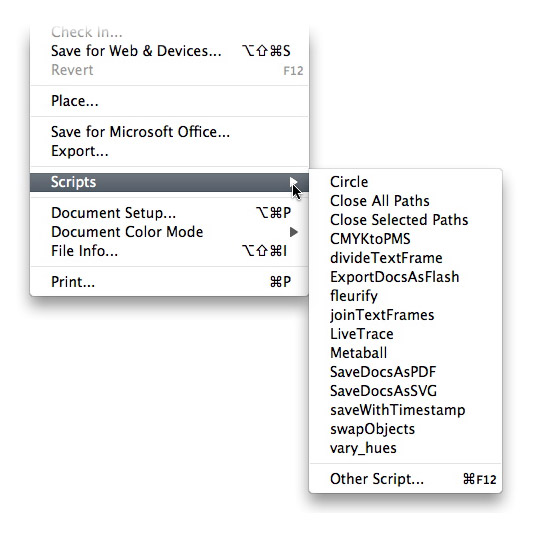
Download the desired script to your hard drive. Once download, place the script in the Adobe Illustrator CS3/Presets/Scripts folder. Once copied to this location, the script will appear in the scripts submenu. In Illustrator, go File > Scripts to find your script.
Close All Paths / Close All Selected Paths
Go to Download (download will start automatically)
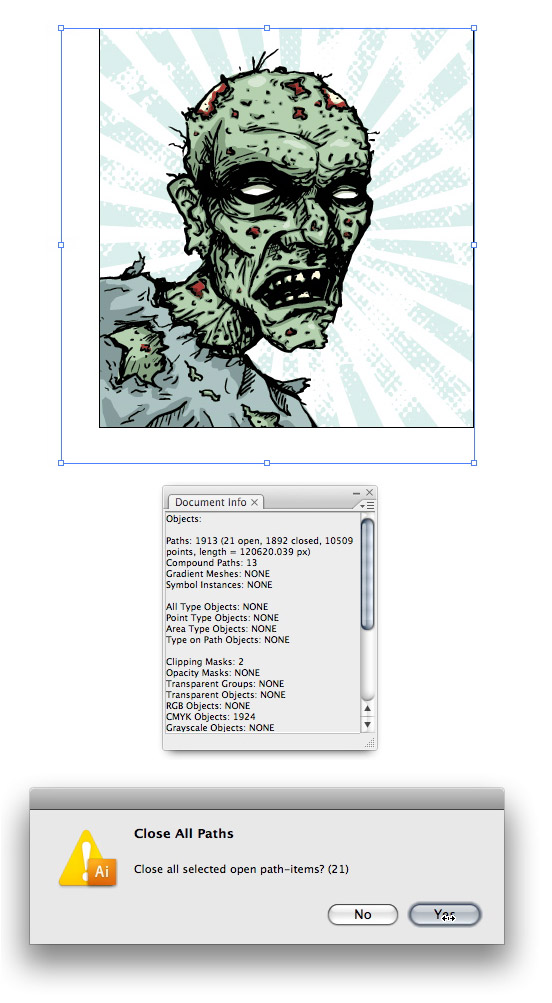
I draw with the pencil and brush tool all the time and sometimes forget to close my paths. With this script, you can close all open or all selected open paths. This script comes in handy when creating illustrations for stock illustration sites because of the vector requirements.
Divide Text Frame
Created by John Wundes
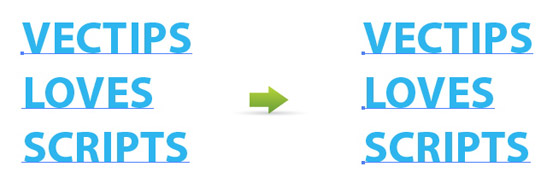
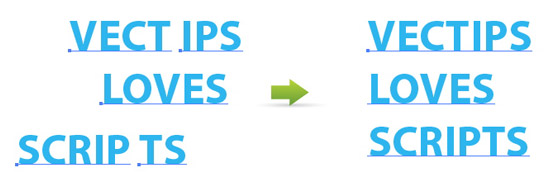
This script is simple but powerful. With this script you can divide multi-line text fields into separate text frame objects, making it easy to separate lists, navigation items, and more.
Join Text Frames
Created by John Wundes
This script will rejoin broken text frames or selected text frames. Great if you open a pre-CS illustrator file or need to combine a couple of text frames together.
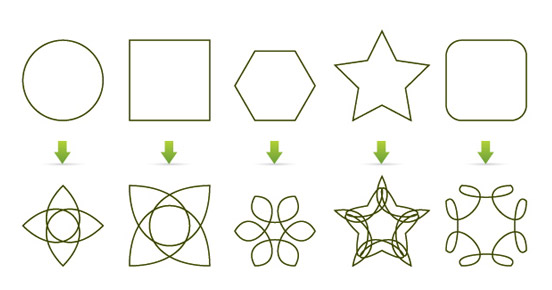
Fleurify
Created by John Wundes
This script will create flowery shapes from basic shapes. Great for creating interesting patterns, logos, and experimenting.
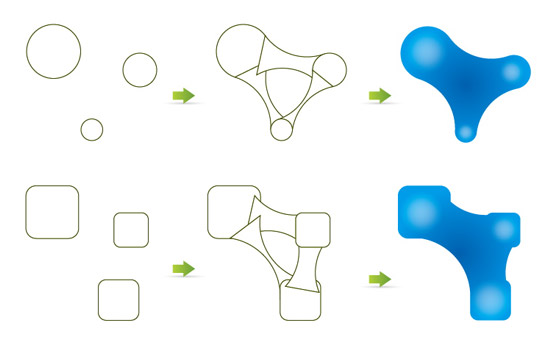
Metaball
Created by SATO Hiroyuki
This script will create connecting arcs from shapes you have drawn. Very useful when connecting basic shapes to create more complex shapes for logos, icons and illustrations.
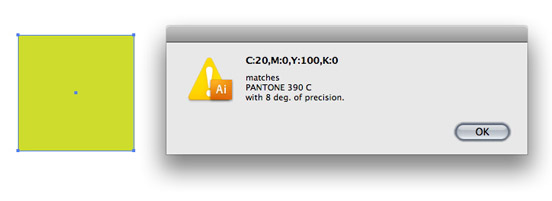
CMYK to Pantone v.2
Created by John Wundes
This script will give you the closet match of a PMS color from a selected CMYK color.
Vary Hues / Randomize Colors
Created by John Wundes
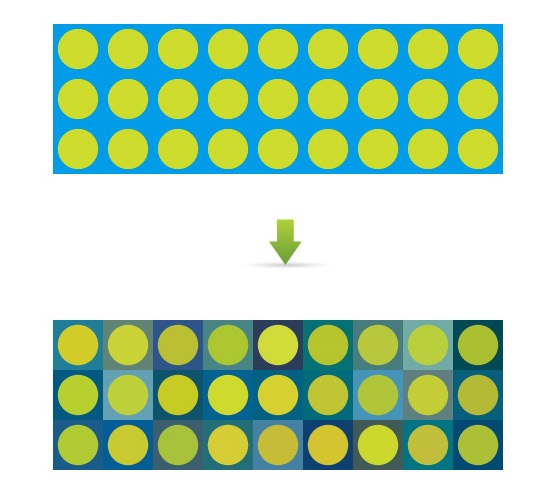
This script will randomize and vary hues for a selected color.
Save File With Timestamps v.3
Created by John Wundes
Go to Download (scroll down the page)
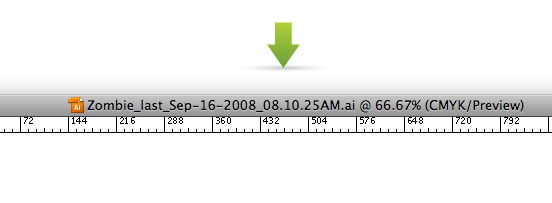
This script will rename the current open file, save the file, close and re-open the file with a new timestamped name. This script helps you keep track of multiple file version. This script has saved my butt a couple of times!
Circle
Created by SATO Hiroyuki
This script will create a ellipse with a specified amount of anchor points. This might seem simple, but it greatly increases your ellipse editing ability for creating brushes, complex shapes and more. Illustrator has a function where you can add more anchor point to an object, but you can’t specify how many extra point you want to add.

Swap Objects
Created by John Wundes
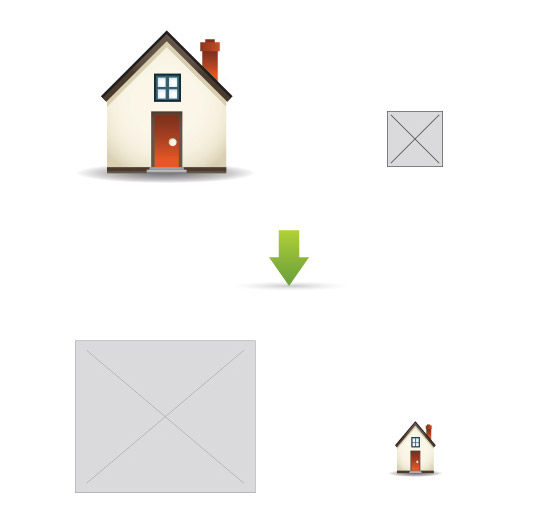
This script will swap the positing and size of two selected objects.
Suggestions?
These are the scripts that I find useful, but was there something I missed? What do you use?


Hello,
Thank you very much for these useful scripts.
Could you help me modify the SWAP OBJECTS script, so to affect only the position and NOT the size of the objects?
Thanks
kCztQY Major thanks for the blog post.Really looking forward to read more. Want more.
I need a script which stop the artist to save if he did not run the spell check in his job. Could someone help me to get it.
I want to select text object(Text object only) and move one step right and save the file automaticall.
Any one have script please share.
Heys guys i would like to ask you if you know some script which can renumber paths.
I have a problem that my laser cut path by path depend on their number. I would like to renumber it, for example regard to layer or idk right now.
I would like a script whereby I could assign a number to each color of a traced image. This I am going to use to design “paint by numbers” pictures for my 10 year old grandson. Please help. Thanks in advance!
Do you know of a script that will replace an assigned ASE file and take those pantones and fill them in objects?
Maybe a script where you have hex values in a data set that can be assigned to objects that fill them with the hex in the variable?
These are great, I have an idea for a script that im having trouble finding on the web, maybe someone could make it? .. Being able to export using only the sides of the artboard as crop marks, and using the graphics top and bottom as the other crop marks. If anyone knows of one that exists let me know!
I need a script that will export all grouped items as their own illustrator files. My use case is that I am trying to create a shared icon library with creative cloud but I have hundreds of icons in one file which doesn’t work.
Thanks for sharing.. I use it in my logo design.. you can check here.
http://graphicbag.net/items/535/Ladies-Bag-Logo.html
Thanx for sharing, divide text script really useful for me, and it’s free 😀
Link to “Close All Paths / Close All Selected Paths” is broken.
Just what I was looking for. Getting started in illustrator and love it.
Very useful collection of scripts!
I use Magic Eraser script for cropping vector http://youtu.be/T5LwsJhcQM8
And ProSpirograph action http://youtu.be/EW4wmW8zVJQ
This is very interesting, You are a very skilled blogger.
I’ve joined your rss feed and look forward to seeking more of your
wonderful post. Also, I’ve shared your site in my social networks!
there is also this one, anyone is welcome to use it, I use it all the time http://hellowoo.com/illustrator/illustrator-script-to-clean-empty-text-boxes/
Hello,
Is someone know how to extract in batch mode the text content of .ai files present in a folder ?
I’ve trie d invbscript with CS5 scritping guide but i can’t launch a .ai file in illustrator as it seems to work with activedocument only.
However i open manually my files in illustrator, i have 2 messages to validate , ” substitution fonts” and “old version file to convert”…
I have more than 500 files wich i want to extract the content..
Many thanks by advance,
Stephane
I use Round any Corner all the time. Thx.
I frequently need to align the top of one object to the bottom of another or the left side of one to the right of the other. If anyone knows of scripts to do that, it would save a lot of fiddly work.
Hi!
Great things here. Apparently easy, but not.
Usefull !
For sciences and technics, I’m loojking and trying to draw sheet with log-log grids, log-sin grids, etc… so, in a nutshull, I would like to selct for X and Y axis the type of scale to draw my curves.
if someone as an idea.
Thanks much for this page.
I have got a few more cool scripts:
http://www.behance.net/gallery/For-the-birds-Illustrator-scripts-CS4-and-up/2964869
http://www.behance.net/gallery/PMS-adapter-Illustrator-scripts-CS4-and-up/3305916
http://www.behance.net/gallery/Toon-boom-Illustrator-scripts-CS3-and-up/887439
http://www.behance.net/gallery/Pure-chaos-Illustrator-scripts-CS3-and-up/871562
http://www.behance.net/gallery/Spiral-Illustrator-scripts-CS3-and-up/845602
http://www.behance.net/gallery/Blowfish-IT-Illustrator-scripts-CS3-and-up/806396
http://www.behance.net/gallery/Totaly-Twisted-Illustrator-scripts-CS3-and-up/806393
http://www.behance.net/gallery/Star-IT-Illustrator-scripts-CS3-and-up/806389
http://www.behance.net/gallery/Smile-IT-Illustrator-scripts-CS3-and-up/806388
http://www.behance.net/gallery/Circle-IT-Illustrator-scripts-CS3-and-up/806385
http://www.behance.net/gallery/Trace-vector-to-script-Illustrator-scripts-CS3-and-up/806397
http://www.behance.net/gallery/Box-IT-Illustrator-scripts-CS3-and-up/806379
http://www.behance.net/gallery/Infopanel-Illustrator-scripts-CS4-and-up/806732
http://www.behance.net/gallery/Boxes-beta-Illustrator-scripts-CS4-and-up/3124841
I’ve already reard about a script thats make a packeg lik indesign. Did you know? Could be very handfull
Uuuuu, that’s nice, I’vebeen looking for a CMYK to Pantone converter. Thanks Ryan.
hey is there any way i can find out and record the co-ordinates of different objects on a page in illustrator??…i know very less about illustrator…so plz help…thanx
I screamed “WHERE IS THE DOWNLOAD BUTTON!!!” Then I found it and WAS SO HAPPY tyvm!
YOU KICK SOME SERIOUS ASS DUDE!!!!!!!!!!!!!!!!!!! THANK YOU!!!!!!!!!!!!!!!!!!!!!!!!!!!!!!!!!!!!!!!!!!!
Some of these are gonna be awesome, can’t wait to try them out : Thank You!
One feature/script I would love to see is the ability to export artboards into individual .ai files BASED ON THE NAME/LABEL I’ve attributed the artboards while working. Does that make sense?
So instead of Illustrator saving artboards into individual files named unspecific things like “filename copy 1”, “filename copy 2”, etc, you could end up with “filename Front”, “filename Back”, “filename Spot UV”, etc.
For instance, I use this one online printer often for business cards that requires the files be clearly named “front”, “back”, and also requires individual files for special finishing options. So I build the cards on artboards, export to individual files, then have to relabel everything and reopen each for a double-check that everything is correct. Just seems like there should be an easier way to compose & export & not have to worry that I mislabeled or switched filenames in error.
very very…. thanks so much.
Here’s my own AI export script with sub-layer export and control: https://github.com/cri5ti/ai-layers-export
Thank you sooo much! These are awesome and just found what I was looking for! Thanks a lot! 🙂
Hi everybody!]
Awesome collection of scripts!
I must say that the “Close All Paths / Close All Selected Paths” has a bug. It work’s perfectly in CS4 but it has an issue. If there is an open path witch contain only one point the script will apparently close that path but in fact it won’t do that. It seams that the script will close the open paths witch contain at least two points but will not delete those single points and those single points are in fact open paths too.
I hope this will be an answer for those of you who don’t know why in some cases the script will not work.
But most important thing is that those open paths (single points) will be visible in document info panel after the file will be reopen in illustrator and only then.
I use this script frequently and I am grateful for ….
I hope that the script will be readjusted if this is possible.
Thank you!
Best wishes,
Thomas
Salamat(thanks) from Philippines
Great, thanks! Brazil…
I need a Illustrator script to save open files as eps.
nice, some great scripts here. i especially like the Close-All-Open-Paths script. the CMYK-to-PMS script should come in handy, too..
Hi there,
Does anyone know if there is an AI CS4 script that can export coordinates and dimensions of rectangle elements within an illustrator file?
I can do it with SVG export, however the SVG gives me coordinates and dimensions in pixels, and I need them to be in mm or cm.
Thanks a lot.
(please email me at aki.giannikopoulos/@/gmail.com)
Hello admin,
Thank you this great trick
Hi dear,
Great work!
I have one question about Illustrator cs3`s plug-ins/scripts:
Do you know if there is plug-in/script for reading layered PDF in Adobe Illustrator CS3?
I have one layered PDF file, made in AutoCAD 2006 by “Convert to PDF button”. But Illustrator merges all layers from PDF in one, when I open this PDF in Illustrator.
So I wonder if you know if there is any plug-in or script that solves that?
Thank you in advance!
Tajana
This is very, very, very helpfull… Thank you!
Great stuff.
How about a grid making script for rule of thirds or varies golden mean layouts.
Does anyone know if there is there a script function for “Save a Copy” rather than “Save As”?
did you ever find out how to script “Save a Copy”?
Hi there,
first of all: really cool scripts, thanks for sharing!
I’m writing my own Illustrator Scripts to automate parts of our workflow. Now I ran into a (hopefully) little problem I haven’t been able to solve so far, although I’ve been trying for several days. It would be great if anyone had an idea of how to solve it:
My script runs on Illustrator CS4 and the files I want to process contain a semi-transparent object (a group of component paths). I need to save this file as a CS3 EPS which works fine with my script, but the files can’t be used in our print application – there are some EPS Save Options that I need to set manually but can’t find a solution to automate them:
When saving the file manually, I need to select the Preset “High Resolution” in the transparency section of the EPS-Options dialog (I’m using the german version of Illustrator CS4 so my translation may be wrong – sorry for that). Is there a way to set that option by script? I’ve also tried to record an action which I can run from my script but the EPS save options aren’t recorded so that won’t work either…
As this is an everyday task and most of the times, hundreds or even thousands of files need to be processed, manual re-saving is not an option. I would appreciate any tipps or workaround to get this done automatically.
Thanks in advance for your help! If you need to see some of the code in order to help, just tell me.
Tobi
Hi,
Did you got any solution for the same.
MOhan
hm..this post really usefull.thanks..
but, i need script that allow AI to work like 2D CAD –> ex: display the dimensions of objects.
anyone can give me the script?
thanks
Thanks a lot, it helps a lot.
just one more question, might be easy for you to answer:
I’d like to automate some settings in “Document Setup”, such as change mm to cm, etc…
where can I find a script for this?
Many thanks for your help.
Lou
I don’t know of any script for this, but you can create your own New Document Profile. Create a new document, change everything you would like (mm, grids, or whatever), and then save the document to the New Document Profile folder on your computer. Now when create a new document, use your custom profile.
These are the default location for the New Document Profile folders.
Mac = Username/Library/Application Support/Adobe/Adobe Illustrator/CS4 (or whatever version you are using)/en-US/New Document Profiles
PC= C:/Documents and Settings/Username/Application Data/Adobe/Adobe Illustrator CS4 Settings (or whatever version you are using)/en-US/New Document Profiles
Hi !
I am making an AppleScript to export from AI to JPG with different options.
In the AI jpg export dialog box there is some options I would like to script like : Resolution depth (screen/medium/high/custom), Embed ICC profile (yes or no)
How do you know the syntax for scriptingt these options with AppleScript ? I have been on google but can’t find any clue 🙁
Thanks for any help.
Martin
Hi guys,
Thanks for the great scripts collection.
Just one question, how do i download the Metaball script.
At the very top of the lined page you have to download all the scripts in one zip and it is not too big a zip file.
Great site! I have a AI file with about 60 layers. Is there a script to export each layer to its own AI file?
I have see this Layer Export Script:
http://www.metaphorical.net/note/on/layer_export
But I haven’t tested it out yet. It will export layers as PDF, which should be fine instead of an AI file.
This one might save my life! Can’t wait to test it out!
Hi!!! thanks for all of these…one question…I can’t seem to make these work on CS4..Are they only for CS3?
Thanks,
M
That’s weird, most of them work on CS4 for me. Which ones are giving you problems?
Thats great dude! thanks a lot
Can anyone point me to a script that will work with CS4 which allows one to:
(1) Export text layers to a text file.
(2) Import the text file back into the image, after modification, overwriting the original layers?
This would be very useful for translating AI images into other languages.
Thanks!
Hi,
Even am exactly looking for a similar requirement, did u managed to find the script for this?
–Suneel
Nice stuff!
Can anyone tell me if there excists a script for a size variation?
The information obtained from this very helpful for me, thank you.
Would love a script that outlines all the fonts. As alot of my fonts are grouped with symbols,pics. So I have to isolate each to then outline. Any ideas how to overcome this???
Great Rype!
Awesome tips, downloading all scripts. These scripts works in CS3 too? Thks.
Great Collection!
here’s a contribution: Export multiple JPG’s from each individual layer in an .ai file.
the script creates a JPG from each layer using the crop marker as the file size. layers named “ALWAYS” are added to each each individual layer export (for things like a logo or header)
download it here: http://supermetricity.com/2009/02/11/save-layers-as-jpgs-from-illustrator/
Thanks for the link!
That script is a life saver! Been looking for something like this for a while. This is esp useful in pharma advertising where you need to PDF over and over again every design comp after revising bits and pieces of different files.
Export files from layers?
What a brilliant collection of useful scripts!
Have you ever come across (or thought of creating) a script that automatically swaps the screen and color settings required for working for web and for print?
I work on both and is always such a pain to go through all the preview/col settings/convert for web sRGB thing.
just an idea!
still thank you for all these!
Haven’t heard of one, but I will keep an eye out.
Great list! My designer will be thrilled with the CMYK to Pantone script. Oh, and I second @Jesse’s suggestion of Round Any Corner – I use that one all the time.
Great post! very useful
you are on your game!! I love the Fleurify but really they are all great. My graphic designers will thank you.
Extremely useful to me! I bookmarked it at first place.
very good, thanks
Glad not everything is in double-outlined fonts. It’s impossible to read!
Thank you! Great ideas.
great post…
tnks
http://kelsocartography.com/scripts/
freehand tools that ai don’t has. Find/replace script,etc…
This is great for future projects, but sadly not useful for my current project!
These are SO great! Will save me tons of time! I just tried the join text frame to deal with imported text from a .wmf file and it rocked my socks! Thanks so much! I sure hope they will work in CS4 too…
thanks! that cmyk to pantone script will save me loads of time 🙂
Great tips!
THKS
Heroic !
Wow this is awesome. I’ve used a few scripts in the past. Many of them crashed Illustrator, but were very handy. These are the kind of tips that are near and dear to my heart – thanks for the post.
CMYK to Pantone is already a part of CS3. It’s one of the functions in the Color Groups panel. I just used it yesterday, and it rocks too, once you figure out where it is in there. Adobe needs to make Color Groups a little more intuitive, but it’s worth the learning curve.
Hello dear
I need to copy all fonts in a folder which I had used in my .ai file in illustrator and psd file in photoshop, I am searching any plug-in or script that can copy all used fonts in a news folder.
Can you solve my query?
Thanks
Subhash Khatri
Great, very useful, big big big thanks!
Hey again! thanks for the reply. Actually the reason I am looking for that ‘scissors’ method is cuz I’m trying to build a script that’ll assist in creating animations. Say you draw a line using the pencil tool – use ‘add anchorpoints’ to populate the line with more points – then run a script that seperates the line into segments. After releasing to layers you’ve got a stepped animation. This would seriously shorten certain animation techniques in Flash projects. Anyways … it’s something I’ve been toying w/ for a while but I’ve hit a wall … but seems like such an obvious method to include in the scripting environment. If you have any eureka moments please keep me posted.
Keep up the good work
Dre,
Haven’t seen a script that would do this, I will keep an eye out. If I’m understanding what you wan to do, you should be able to do it pretty easily just with Illustrator. If the line is horizontal, create another vertical line and center it with the line you want to split with the Align Center button in the Align Panel and the press the Divide button in the Pathfinder Panel with both lines selected. This should create two separate paths. You will probably need to Ungroup the paths after you divide them.
Let me know if that was what you were looking for.
Awsome post! Thanks for the valuable code. Does anyone know if it is possible to split a line consisting of 3 anchorpoints at the middle anchorpoint using a script? I’ve been scratching my head trying to figure that one out for a while now.
I always come here to find ways to make work more enjoyable.
You never let me down.
Thanks!
Thanks again for some useful tips!
CMYK to PMS is just woo hoo! 🙂
/H
Really great post Ryan! This is the best script post that I’ve seen. Everything is VERY useful! Thanks!
Ben,
Thanks for the catch. I must of just been hungry when writing!
I think it’s metaball, but I’m gonna rename mine to meatball because it sounds delicious.
cmyk to pantone rocks!
Guido,
You can record the script as an Automation and set a Function Key to the automation, pretty handy.
Ross,
I will keep an eye out for a type script like that.
Shir,
I updated the link for the Circle script.
The “Circle” script is nor available 🙁 … error on page
Do you know of a script that can convert area type to point type. When a legacy freehand file is opened in Illustrator, all text is converted to area type, it would be great to convert it to point type and then run the join text frames script.
Try this:
http://kelsocartography.com/blog/?p=317
these look great! can you link a script to a shortcut combination? because the save script looks great but I like to shortcut it..
I notice you didn’t include the script I showed you a couple weeks ago:
Round Any Corner
This script makes it SO easy to round nothing but the anchor points you WANT to round – and to the exact radius you specify. Thanks!
Jesse
Portfolio
Blog
I LOVE ‘Round any corner’ that thing is awesome!
Agreed!
This is probably the one I use most.
Wow! Thank you so much! as written before, the CMYK to Pantone is a great find!
Jesus! Great!
this scripts made my day!!
CMYK to Pantone v.2 and Save File With Timestamps v.3 RULZ!!!!
Byte,
Most of the scripts should be compatible with 10 and later.
Awesome collection of scripts! I’ve never used them before, but I’ll certainly be using the Close Open Paths and Pantone one for designing tees. Any clue on whether these will work in CS2?
Wow, these are all great. Thanks for posting.
Matt,
If you select both overlapping anchor points of two different paths with the Direct Selection Tool and go Object > Path > Join, you can join the paths. If the anchor points are on the same path you can just use the Selection Tool then Join. I not that experienced in Freehand to know if this is what you are trying to accomplish or not. Let me know if that helps.
Anyone know of a script that adds Freehand’s Join function to Illustrator? In Freehand, when two objects’ endpoints are overlapping, they can be Joined into a single object. (A single object can be split into two by Unjoing at an anchor point, also.)
I sorely miss this tool in Illustrator.
As always, great stuff here. A lot of them seem so simple, yet I think most of us neglect to take full advantage of our applications. Thanks!
REALLY useful post, thanks a lot!
Thank You! Very juicy stuff! 🙂