
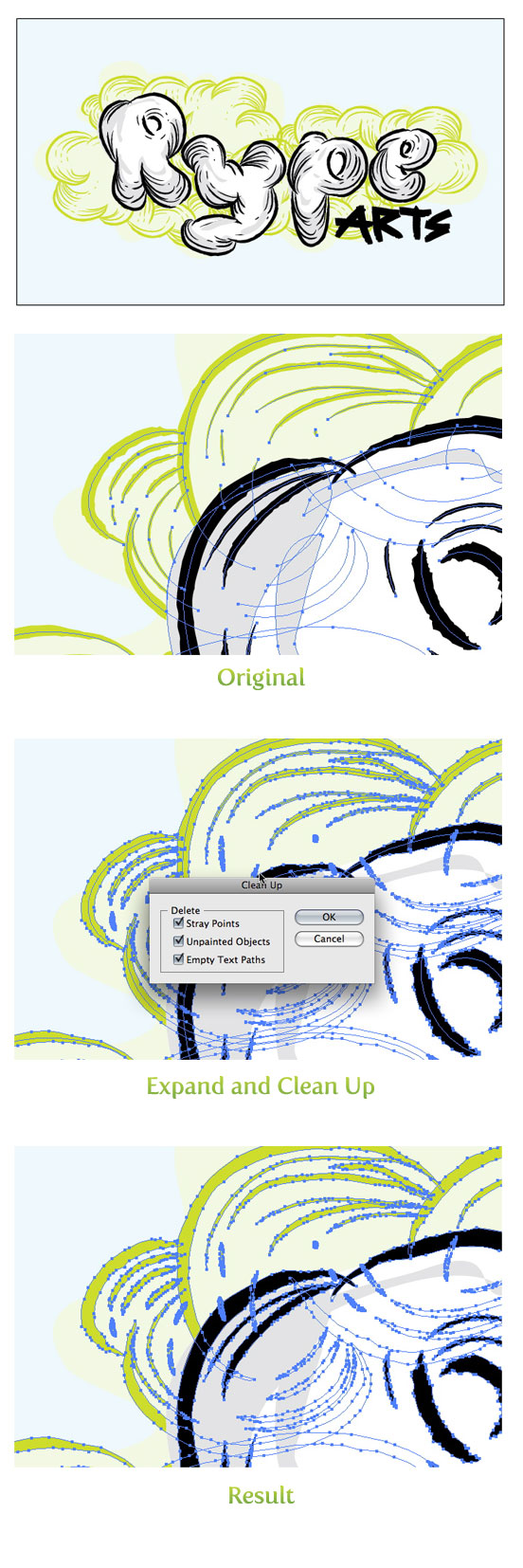
Lately, I’ve been using my Sketch-Style Brushes in illustrations and tutorials. In, some of these illustrations, the brush strokes needed to be expanded to editable paths. When expanding, you also get a bunch of unfilled paths. To clean up, simply go Object > Path > Clean Up and check the Unpainted Objects check box. You can also use this feature to get rid of Empty Text Boxes and Stray Points!


Thankyou for helping out, excellent information.
this was soooooooooo useful!!
never tried this step. thanx soooo much! realy glad ive made it here
Thank you so much! I love your site. This tip will save me a lot of time when I make screenprinting positives!
thats it???wow…thnx man!! 🙂
thank you! i was wondering if there was a simple way to get rid of those unnecessary paths! 🙂 hooray!