
Mordy Golding, author of the Real World Adobe Illustrator series (I can’t wait for his Real World Illustrator CS4 book), has posted a couple of amazing Illustrator CS4 scripts from Shane Stanley to his blog. Mordy was the Product Manger for Illustrator from 2001 to 2004, so you know these will be quality scripts. Upon using the scripts, the usability of Illustrator CS4’s Multiple Artboard function skyrockets.
Artboard Coords Script
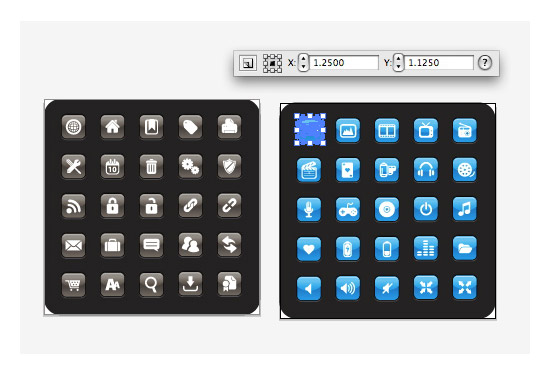
Although there are multiple artboards in Illustrator CS4, there is only one ruler. This can get a little cumbersome when precisely placing objects in different artboards.
Thanks to Shane Stanley, the Artboard Coords Script creates a mini Transform panel that displays the coordinates for objects, relative to each artboard. Pretty handy!
Download the script from Mordy’s post.
PDF Pages to Artboards
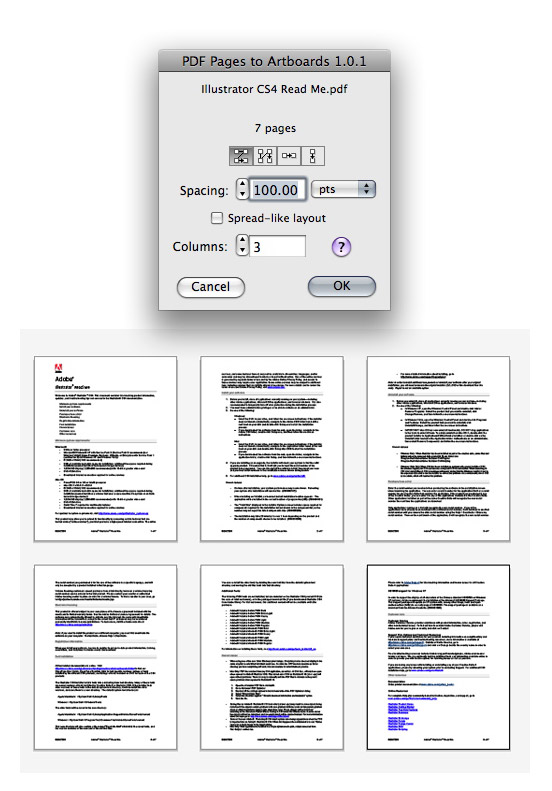
Another slightly annoying factor of the Multiple Artboards feature is that you can’t import a multiple page PDF to a single Illustrator document with multiple artboards.
Again, Shane Stanley come to the rescue with his PDF Pages to Artboards droplet. Simply drag and drop a PDF on the droplet to convert the PDF to single document with multiple artboards. When the droplet opens, you are given arrangement, spacing, and columns options.
Download the script from Mordy’s post.


Superb…………………. 🙂
thanks, thanks alot.
Hello,
there has been an update a while ago. You will find the SL-compatible script here:
http://rwillustrator.blogspot.com/2011/03/convert-pdf-pages-to-illustrator.html
“Unfortunately, the “PDF Pages to Artboards” script doesn’t work on Snow Leopard…”
Does anyone know how to update the script for Snow Leopard. I would pay for it!! ha. Sooo useful. But now useless.
did you find something to make it work on snow leopard ?
I kinda have the same prob here…
Unfortunately, the “PDF Pages to Artboards” script doesn’t work on Snow Leopard…
Man… this is awesome! Thanks a lot for the tip.
Will there ever be a PC version?
Actually there is a workaround that I accidentally discovered.
When you have multiple artboards and the ruler is displayed, just select an artboard to activate. The double click the white square, where the horizontal and vertical rulers meet (top left of screen). You can repeatedly do this for each active artboard. This will make the top left corner of the artboard as coordinate (0,0).
Be careful though when copy-pasting. If you want to copy from an artboard and paste it to an exact location in a same-sized artboard, just reset the coordinate (0,0) to the artboard’s top-left before copying and before pasting in the other artboard!
Thanks, works well. Was working with CS5, copy and pasting from one artboard to another. When I hand to use the CS4 on another mac this function did not work as I had hoped. Thanks again.
Yes they have separate rulers for each artboard but can not place an objet with a position relative of an artboard without this script.
Actually there are separate rulers for each artboard.
“PDF Pages to Artboards” is a great script.
Pretty sweet! I can’t wait to get CS4!
I just got it and can’t wait to get started….