
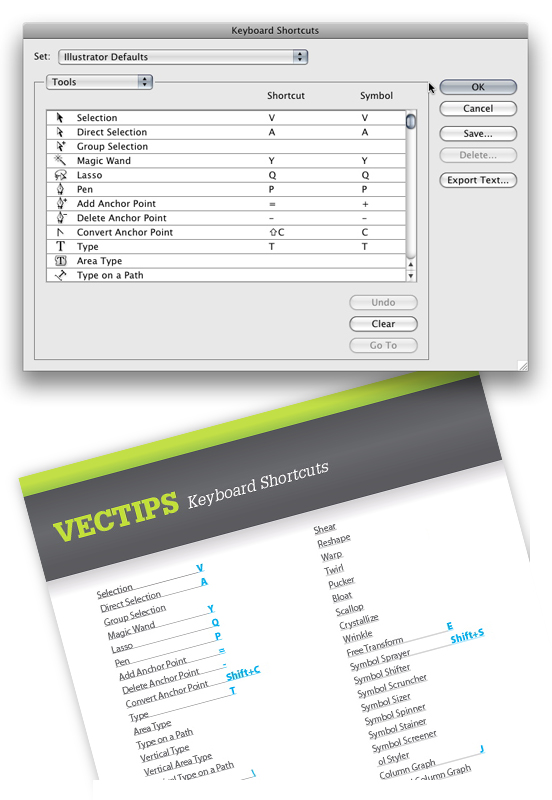
I am a Keyboard Shortcut junkie because Keyboard Shortcuts save a tremendous amount of time! The great thing about Illustrator CS3 is you can customize your shortcuts. Some of you probably know this already, but it’s worth mentioning for you that don’t. Now you can create shortcuts for Illustrator’s Tools and Menu Commands and set multiple profiles!
Customizing
Go Edit > Keyboard Shortcuts to bring up the Keyboard Shortcuts dialog. With the dialog open, you can now change the Tools shortcuts and Menu Commands. If you try to assign a shortcut that is already taken, Illustrator will alert you to the change. You can also save different sets of shortcuts. I switch between profiles depending on the project I am working on. You can even export the text and create your own Keyboard Shortcut cheat sheet!


There are several shortcut keys that used on a computer to perform different functions, but it is also possible to customize a shortcut key manually to do a certain function on the computer. Just follow the article and make a shortcut key.
Thank you, thank you, thank you! I just started a new job where the previous graphic artist had set all the illustrator shortcuts to complete craziness. I was pulling my hair out trying to figure out how to get my shortcuts back! Thanks again!
This is awesome information! I have to thank you for providing so much insight into this subject. I am so happy I found your article.
Hi, this is a question, not a reply, but I do not see where to leave a question. I hope you will get back to me anyway.
I am using archaic Illustrator 9. Can I using 9 or a newer version create a shortcut that will allow me with a single command to apply the same set of effects to a graphic that would normally take several commands?
Thanks, Bob Boylan
Great blog!
A little question: do you know the shortcut for the blending mode? I use it a lot but the Photoshop shortcut (Shift + for Apple) doesn’t work. Other tries doesn’t work either… I use the blend mode a lot and it would be a great timesaver if I know the shortcut…!
Hi! I Just want to ask is there a way to zoom in AI with the mouse wheel? It may sound stupid but it’s important to me! Thanks in advance!
If you hold down the Option/Alt key with the mouse wheel it will zoom.
Thank you for the answer, but i wanted to say that i want to zoom only with the mouse wheel? Is there any “hack” for that?
In Mac OS 10, I think you can assign a custom Apple Script that might let you do that but otherwise I’m no sure.
Thanks for the answers, i will continue to search a walkthrough.
Great, thanks a lot
Awesome! Thanks so much. I don’t know if you do requests or not but can you point or do a tutorial on how to create grass.
I need grass for a school project have no idea how to do. Thanks so much!