
 In this tutorial we’ll be cooking a yummy vector taco in Adobe Illustrator, using basic geometric shapes in order to preserve a simple flat style.
Let’s begin!
In this tutorial we’ll be cooking a yummy vector taco in Adobe Illustrator, using basic geometric shapes in order to preserve a simple flat style.
Let’s begin!
 Are you ready for our next adventure? This time we’ll be creating a flat backpack for camping using geometric shapes, Stroke panel and various tools and functions of Adobe Illustrator. Let’s do this!
Continue reading
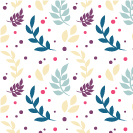 Have you ever wanted to create your own intricate pattern for a website background or textiles and clothes or wrapping paper? Join me in this tutorial and let’s learn to design a gentle floral seamless texture! First of all, we’ll create an Art Brush for floral elements and plants. And then we’ll be using the Pattern Tool to build a pattern in a few clicks!
 In this tutorial we’ll be creating a simple mailbox icon in flat style, that can be used for your newsletter or website design. We’ll be modifying basic geometric shapes and using various handy functions of Adobe Illustrator. Let’s get started!
Continue reading

Since it’s now 2018, I thought it would be nice to kick things off by putting together a little Celebration Icon that you could use in any future projects. That being said, we’ll be using some of Illustrator’s most basic shapes and tools that you probably already work with on a daily basis, so it should be pretty easy to follow me along the process.
 Let’s prepare for the celebration of the upcoming 2018 year and learn how to design a festive postcard that we can send to our friends and colleagues! We’ll be using simple shapes along with some fancy effects of Adobe Illustrator to create a festive look and add a glossy sparkling effect to the whole composition.
Let’s get started!
 Are you ready for Halloween? In this tutorial, we’ll be creating a creepy potion bottle with an eye floating inside! We’ll be transforming basic geometric shapes to create a simple yet balanced composition just in 10 steps. Let’s get started!
Continue reading


