
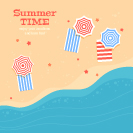
 Summer is here! Let’s enjoy the sunny days by drawing a paradise beach scene in Adobe Illustrator. We’ll be using basic geometric shapes and various tools and functions of the program to depict a seaside with a couple of beach umbrellas and striped towels on a summer card. Let’s get started!
How to Easily Create a Map Icon in Adobe Illustrator
- Tips and Tricks
- July 4th, 2019
- 1 Comment

 In today’s tutorial, we’re going to explore the process of creating a simple map icon in Adobe Illustrator, using some of Illustrator’s most basic shapes and tools. That being said, grab a cup of the freshly brewed coffee and let’s get started. Continue reading
How to Create a Camera App Icon
- Tips and Tricks
- June 27th, 2019
- 1 Comment

 Welcome back to another Illustrator based tutorial, in which we’re going to take an in-depth look at the process of creating a camera app icon, using a couple of basic geometric shapes that we’re going to adjust here and there.
So, assuming you already have the software up and running, let’s jump straight into it! Continue reading
How to Create a Calculator App Icon
- Tips and Tricks
- June 25th, 2019
- No Comments

 In today’s tutorial, we’re going to take a quick look behind the process of creating a calculator app icon, and see how easy it is to turn a couple of basic geometric shapes into a polished usable product.
So, assuming you already have the software up and running, let’s jump straight into it! Continue reading
How to Create a Mobile Authentication App Icon in Adobe Illustrator
- Tips and Tricks
- June 13th, 2019
- 2 Comments

In today’s tutorial, we’re going to learn how to create a Mobile Authentication App Icon, using some basic geometric shapes and Illustrator tools.
So, open up Illustrator and let’s get started!
Draw a Simple Music Character Logo in Adobe Illustrator

 In this tutorial we’ll create a simple face of a cute smiling character listening to music in wireless headphones. We will be using basic shapes and Stroke settings to depict a cute music character logo in a trendy flat style. It can be easily adjusted to your needs and used as an avatar or for branding design. Let’s get started!
Create a Set of Simple Line Icons in 20 Minutes or Less!
- Tutorials
- June 6th, 2019
- 6 Comments

 Create colorful, simple line icons from basic shapes to give your content a cool, cartoony vibe! Today’s tutorial will show you how to use Illustrator quickly and effectively for icons and icon sets. Ready for an iconic tutorial? Let’s get started! Continue reading